Two-Way Conversations
Two-way conversations let logged-in Hush Line account holders continue follow-up inside Hush Line after a logged-in sender submits to another account.
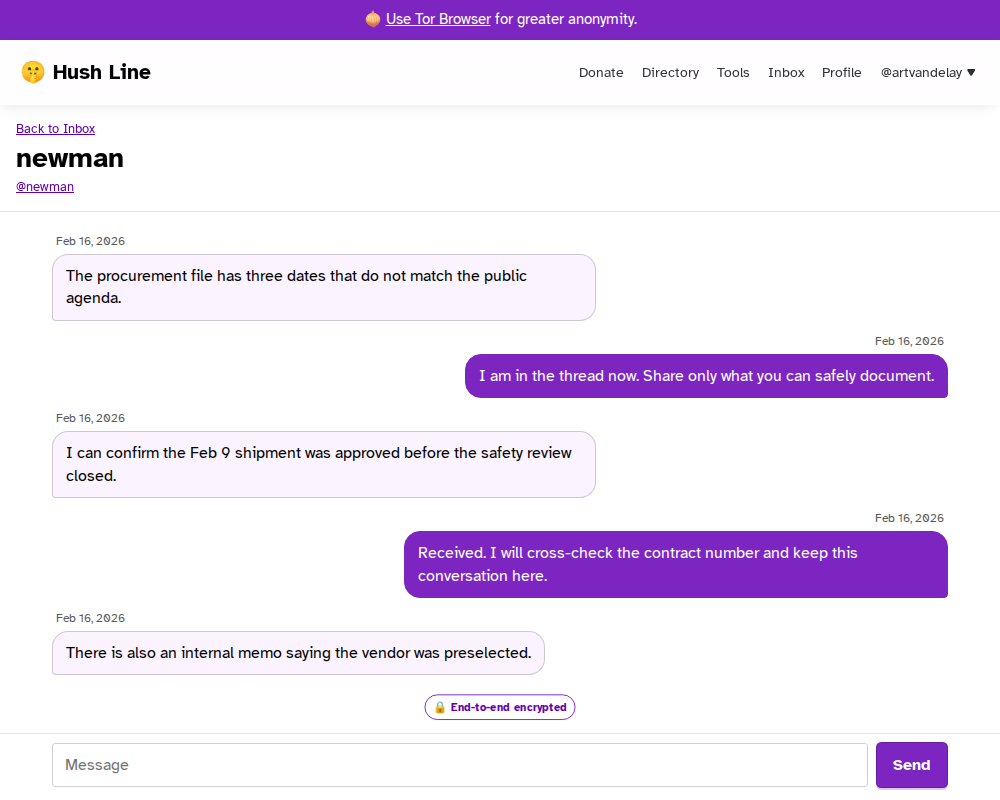
They are different from anonymous one-time reply links. Anonymous submissions still use the normal message inbox and reply/status page, and they do not require the sender to create an account.
When conversations are available
Conversations are available when both sides are logged-in Hush Line accounts and all participants have active, signing-capable Hush Line chat keys.
A Hush Line chat key is separate from your PGP key:
- PGP keys protect one-way tip intake, exports, and optional encrypted email notification content.
- Hush Line chat keys protect account conversation messages in the browser.
If a participant only has older chat-key material or has not finished chat setup, Hush Line may still show existing conversation history where possible, but new replies are unavailable until every participant has signing-capable chat keys.
Reading and replying
- Open the conversation from your inbox.
- Unlock your Hush Line chat key in the browser.
- Read the decrypted conversation content locally.
- Send replies only after the composer is available.
Hush Line stores conversation messages as encrypted copies for each participant. The server does not store conversation plaintext. Conversation notifications and inbox rows avoid plaintext previews.
Deleting conversations
Use the conversation action menu to delete a conversation you no longer need to retain. Deleting a conversation removes the encrypted follow-up thread and its participant message copies. If the conversation began from a one-way intake message, the original inbox message remains without an attached conversation link.
Notifications
Conversation notification emails are generic activity alerts. They tell you to log in and unlock your chat key, but they do not include conversation plaintext or conversation ciphertext.
This is true even if you have enabled message-content notifications for one-way tip intake.
What conversations do not hide
Two-way account conversations are not the same as anonymous submissions. The server still needs operational metadata such as participants, timestamps, unread state, and recent activity to show the inbox and send notifications.
For the lowest-friction anonymous sender path, continue using the standard public tip form and reply/status link.